For my second bootcamp project, I moved past static hosting and built a real three-tier architecture from scratch with CloudFormation — a load-balanced, auto-scaling WordPress site backed by a private database and shared storage. Here’s what I actually built, and what I learned putting it together.
The problem with one server
A single EC2 instance running WordPress works fine until it doesn’t — it can’t handle a traffic spike, and if it goes down, so does the whole site. The fix is to split the system into three independent tiers that can each fail or scale on their own.
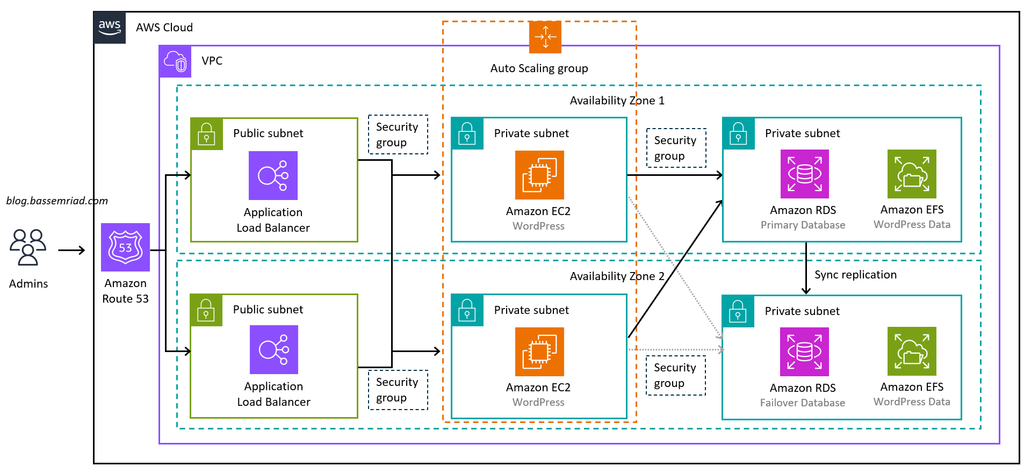
The web tier
An Application Load Balancer sits in front of an Auto Scaling Group of EC2 instances, each running Apache and PHP. The ASG watches CPU usage and launches a new instance automatically once it crosses 70% — the ALB starts sending it traffic the moment it passes a health check. No manual intervention, no downtime.
The database tier
MySQL runs on RDS, inside private subnets with no route to the internet at all — it’s not reachable from outside the VPC no matter what. The master password is generated and stored by Secrets Manager, never written into any file or typed by hand. Later, I added a read replica and wired it in with HyperDB, so read-heavy traffic (most of what a blog does) can be split off from writes.
The storage tier
Uploaded media doesn’t live on any one instance — it’s stored on EFS, mounted at wp-content/uploads on every server at once. That means an image uploaded through one instance is instantly visible from all the others, and it survives an instance being replaced entirely.
Making it faster: CloudFront and Redis
Two optimizations on top of the base setup: CloudFront now sits in front of the load balancer, caching static assets like images at edge locations worldwide — a second request for the same image comes back from the edge, not from EFS. And Redis (via ElastiCache) caches WordPress’s database queries in memory, so PHP doesn’t have to round-trip to MySQL on every single page load.
What I’d tell past me
The trickiest bug wasn’t infrastructure — it was WordPress not realizing it was being served over HTTPS, because CloudFront terminates TLS at the edge but talks to the load balancer over plain HTTP internally. That one cost me a redirect loop on the admin dashboard until I found it.
Everything here deploys with a single CloudFormation stack, and redeploys automatically on every push via GitHub Actions, authenticating with a short-lived OIDC role instead of stored AWS keys.